Deleted SQL Records Recovery - Get Back SQL Records !

You can easily use SysTools SQL Recovery software to recover deleted SQL records. SQL versions 2000, 2005, & 2008 are supported by our tool

Are you thinking – "How to recover deleted records in SQL?" then our software can help you in performing deleted SQL records recovery. SysTools SQL Recovery software is a third-party tool that you can use to recover deleted SQL records.

Deleted SQL Records – Easy Recovery: Tables are an important element of SQL database Server application. These “Tables” have two attributes – rows and columns, where all the information is stored. The information stored in these tables is called records. Now, it is a possibility that while working on the databases, your SQL records can get deleted. To recover deleted records in SQL, you can use SysTools SQL Recovery software. It is a simple and intuitive tool that can be easily used for deleted SQL records recovery. 

Absolutely FREE Trial of the Tool - Get Demo Version

A great benefit of associating with SysTools is that you can avail the facility of FREE trial of the tool before buying it. Download the FREE Demo Version of SysTools SQL Recovery software to evaluate our product’s performance.

Download MS SQL Recovery tool Recover Corrupt MDF Database

Using this Demo Version, you can see the process to retrieve deleted records in SQL Server but cannot save the recovered contents to your system. For saving records, you must buy the Full Licensed Version of our software.

SQL Records Recovery Benefits: You can use SysTools SQL Recovery software for performing the following recovery tasks for different SQL Server versions:

  • Recover deleted records in SQL Server 2000: Our software can perhaps be the perfect answer to your question – “how to recover deleted records in SQL Server 2000?”
  • Recover deleted records in SQL Server 2005: Our software can perhaps be the perfect answer to your question – “how to recover deleted records in SQL Server 2005?”
  • Recover deleted records in SQL Server 2008: Our software can perhaps be the perfect answer to your question – “how to recover deleted records in SQL Server 2008?”

How To Retrieve Deleted Records In SQL Server? SysTools SQL Recovery software can be one single answer to all the questions rising in your mind – “How to retrieve deleted records in SQL Server 2000?”, “How to retrieve deleted records in SQL Server 2005?”, “How to retrieve deleted records in SQL Server 2008?”, and “How to retrieve deleted rows in SQL?” Following are some easy and quick steps for deleted SQL records recovery using our product:

  1. Open and run SysTools SQL Recovery software on your system
  2. Choose corrupt MDF file of SQL Server (2000/2005/2008)
  3. Click the ‘Recover’ button to recover data from selected MDF file
  4. View the recoverable data
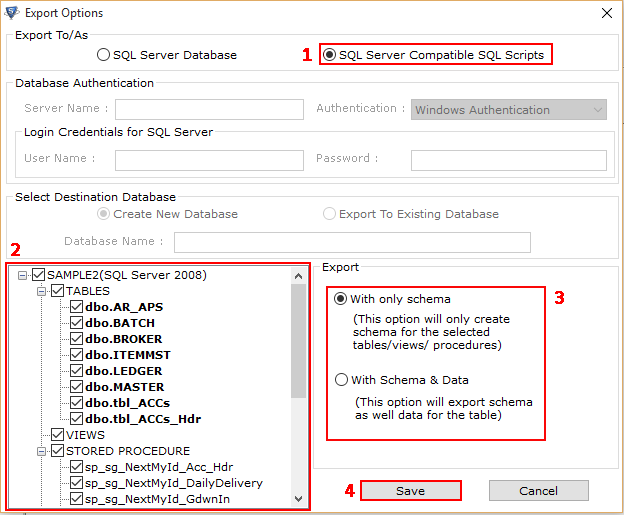
  5. Click the ‘Export’ button to save the recovered database contents
  6. Choose “Save deleted records as well” option
  7. Click ‘OK’

Features:

  • Recover SQL database contents from corrupt MDF files
  • Restore SQL database without log file.
  • Recover deleted SQL records.
  • Recover corrupted tables, databases, triggers, views, stored procedures, database constrains & indexes, rules, checks, default values, objects and user defined data types.
  • Recover damaged primary keys, unique keys & foreign keys.
  • SQL 2000, 2005, and 2008 supported.
  • Almost all Windows versions supported including Windows 7. 

Full Licensed Version – Get It Now!

Full Licensed Version of SysTools SQL Recovery software will help you to perform complete SQL recovery. You can recover almost all SQL database elements (including tables and their deleted records) easily and can save ALL the recovered contents (including the recovered records) to your system using this Full Licensed Version of our software. Personal License is only for $129!  

Purchase Online Started at $129

tumblr tracker